Forms, examiners and candidates are assigned to the rotations with tags. This page describes how the content is tagged, what the Order column does, and how tags and order are imported with the participant list.
You can find general information about tags, filters and groups in the Tagging section of this manual.
Video: Preparing the content (3:26)
Tag Content
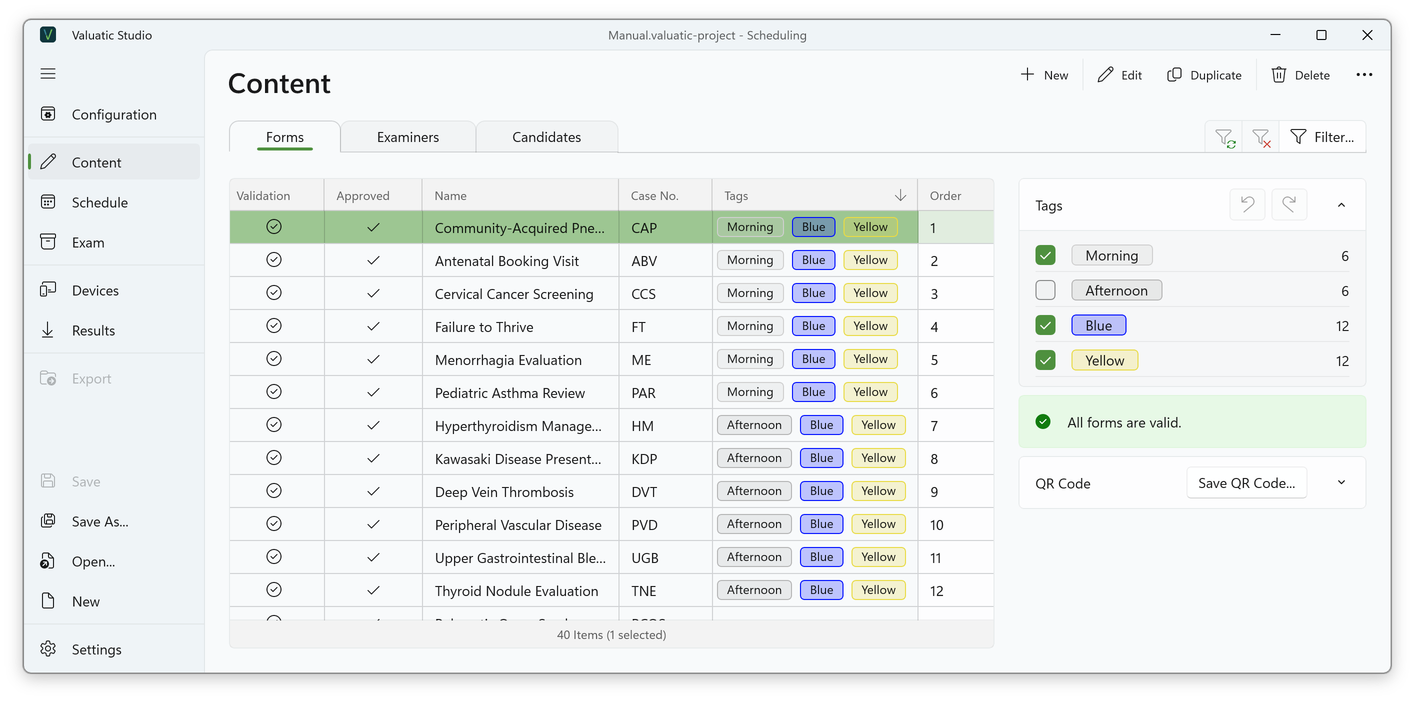
On the Content screen, select one or more records and tick the matching tags in the Tags panel on the right. For each tag, the panel shows how many items carry it.
Which tags each form, examiner and candidate needs is described in Planning the Tags.
Order
The Order column of the forms, examiners and candidates defines how the stations are filled when they are generated:
| Content | The order defines |
|---|---|
| Forms | The order of the stations: the form with order 1 becomes station 1, and so on. |
| Examiners | At which station each examiner is placed. |
| Candidates | Where each candidate starts the rotation: order 1 starts at the first station, order 2 at the second, and so on. |
If no order is set, the content is sorted alphabetically.
Import Tags and Order
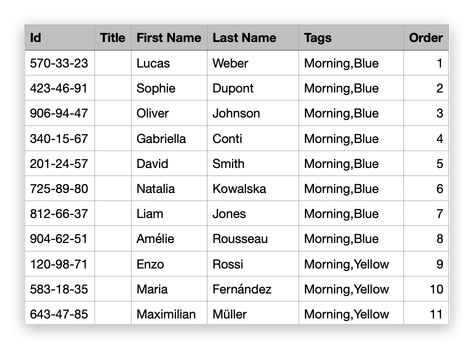
Participant lists are usually prepared in Excel. Tags and order are simply two more columns of the list: one row per examiner or candidate, with the columns Id, Title, First Name, Last Name, Tags and Order:
- Tags: separate several tags with commas, e.g. Morning, Blue.
- Order: a number, see Order. It can be left empty.
To import the list, save it in Excel with File > Save As and the file format CSV UTF-8. The name of this format depends on the language of Excel:
| Excel language | File format |
|---|---|
| English | CSV UTF-8 (Comma delimited) (*.csv) |
| German | CSV UTF-8 (durch Trennzeichen getrennt) (*.csv) |
| French | CSV UTF-8 (délimité par des virgules) (*.csv) |
| Italian | CSV UTF-8 (delimitato da virgole) (*.csv) |
Note: Tags that don’t exist yet are created automatically. If a participant with the same Id already exists, it is replaced, so tags and order can be corrected by importing the list again.