This page explains how Valuatic builds a schedule from your content, and how to plan the tags for your exam.
Video: How scheduling works (2:08)
Valuatic builds the schedule in three steps: from the content of the project to a rotation, from the rotation to its stations, and from the stations to the rounds of the exam.
The illustrations use the example exam of the First Steps: 32 candidates in a morning and an afternoon session, each with a blue and a yellow rotation. They show the rotation Morning - Blue.
From Tags to Rotations
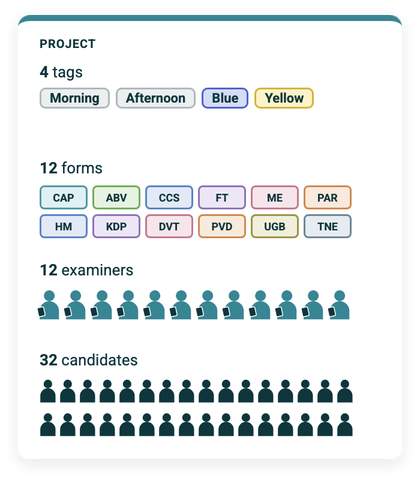
The project contains all the content of the exam: in the example, four tags, 12 forms, 12 examiners and 32 candidates. Tags organise this content: short labels such as Morning or Blue are attached to forms, examiners and candidates. They also help you filter long lists.
A rotation is configured by selecting tags, here Morning and Blue.
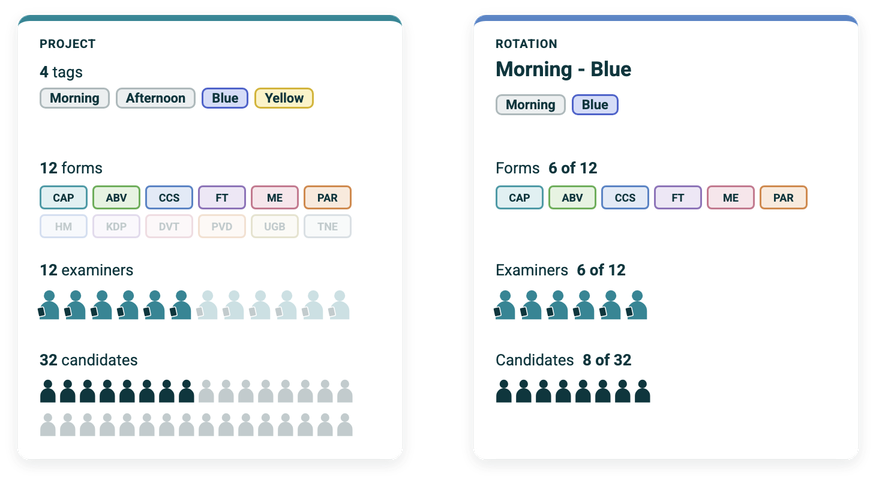
The rotation only uses the content that carries all of its tags: six of the twelve forms, six of the twelve examiners and eight of the 32 candidates. The rest is greyed out in the project. This way, each rotation only works with what belongs to it, and even a large exam stays easy to handle.
From Rotations to Stations
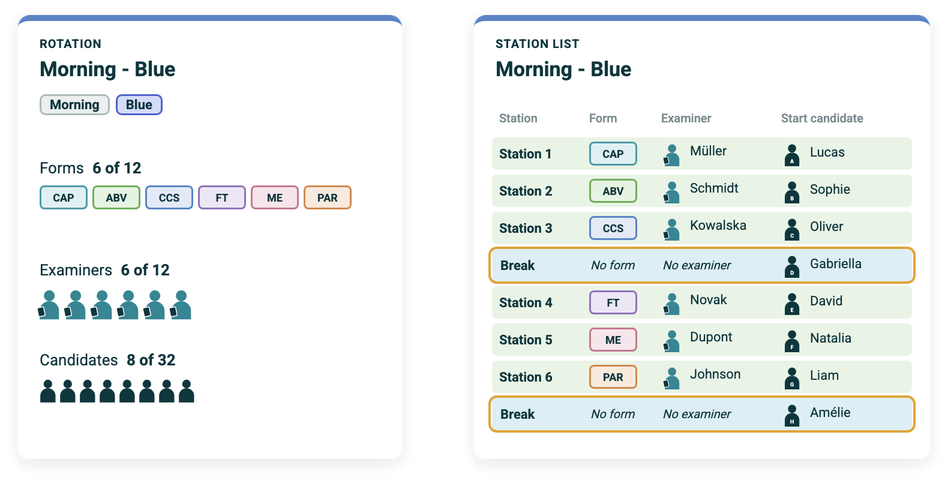
Within the rotation, the content is arranged in stations. Each row of the station list is one station, with a form, an examiner and a start candidate.
With eight candidates and only six forms, two break stations are needed. They have no form and no examiner.
From Stations to Rounds
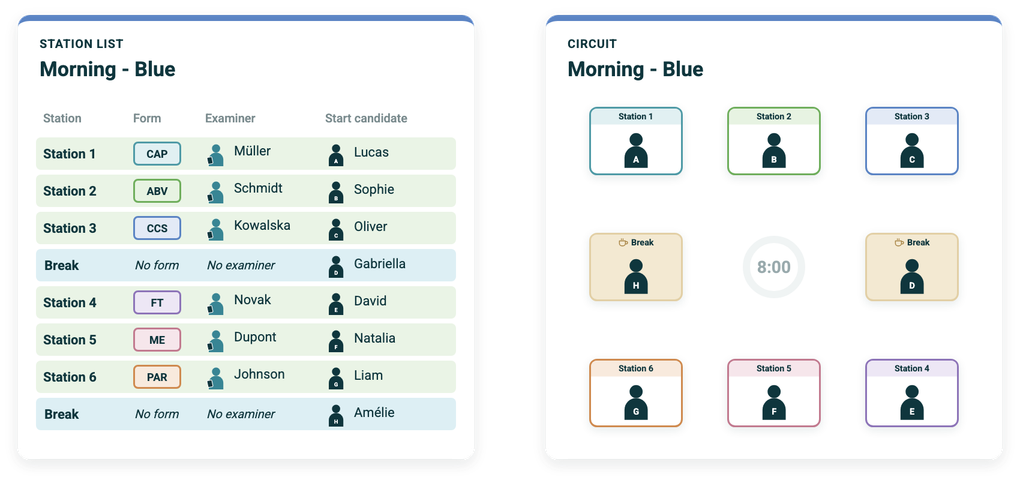
The station list describes the circuit of the rotation. In the first round, every candidate is at their start station: Lucas at Station 1, Sophie at Station 2, and so on.
The form and the examiner stay at their station for the whole rotation; only the candidates move. When the next round starts, every candidate moves one row down, to the next station, and the candidate of the last station moves to the first one. So the start candidate only defines where a candidate begins. From there, the rotation takes care of the rest.
Ghost Candidates
A ghost candidate is a placeholder that moves through the rotation like a real candidate. Wherever it is, that examiner has a pause. Ghost candidates are used, for example, to give the examiners a break.
Planning the Tags
Before tagging, plan the tags that describe the structure of your exam, e.g. one tag per session (Morning, Afternoon) and one per parallel track (Blue, Yellow). Each rotation is then defined by a combination of these tags, e.g. Morning and Blue.
Since a rotation uses only the content that carries all of its tags, each record has to carry every tag of every rotation it belongs to:
- Forms that are used by several rotations carry the tags of all of them. E.g. when the blue and the yellow rotation of the morning use the same cases, these forms carry Morning, Blue and Yellow.
- Examiners who assess in several sessions carry all of these session tags, e.g. Morning, Afternoon and Blue.
- Candidates belong to exactly one rotation and carry exactly its tags, e.g. Morning and Blue.
Note: A form tagged only Blue does not appear in the rotation with the tags Morning and Blue: it carries Blue, but not Morning. Content has to carry all tags of a rotation to be part of it.
The order of the forms, examiners and candidates defines how the stations are filled when they are generated.
Tip: Order the forms like your room plan, so station 1 is the first room of the circuit, station 2 the next, and so on.